Introduction and Architectural Overview
Architectural Overview
In this workshop, we will deploy a complete online restaurant application to the AWS environment. The architecture is designed to ensure High Availability, Scalability, and Security by using core AWS services.
Below is the overall architectural diagram of the project we will build:
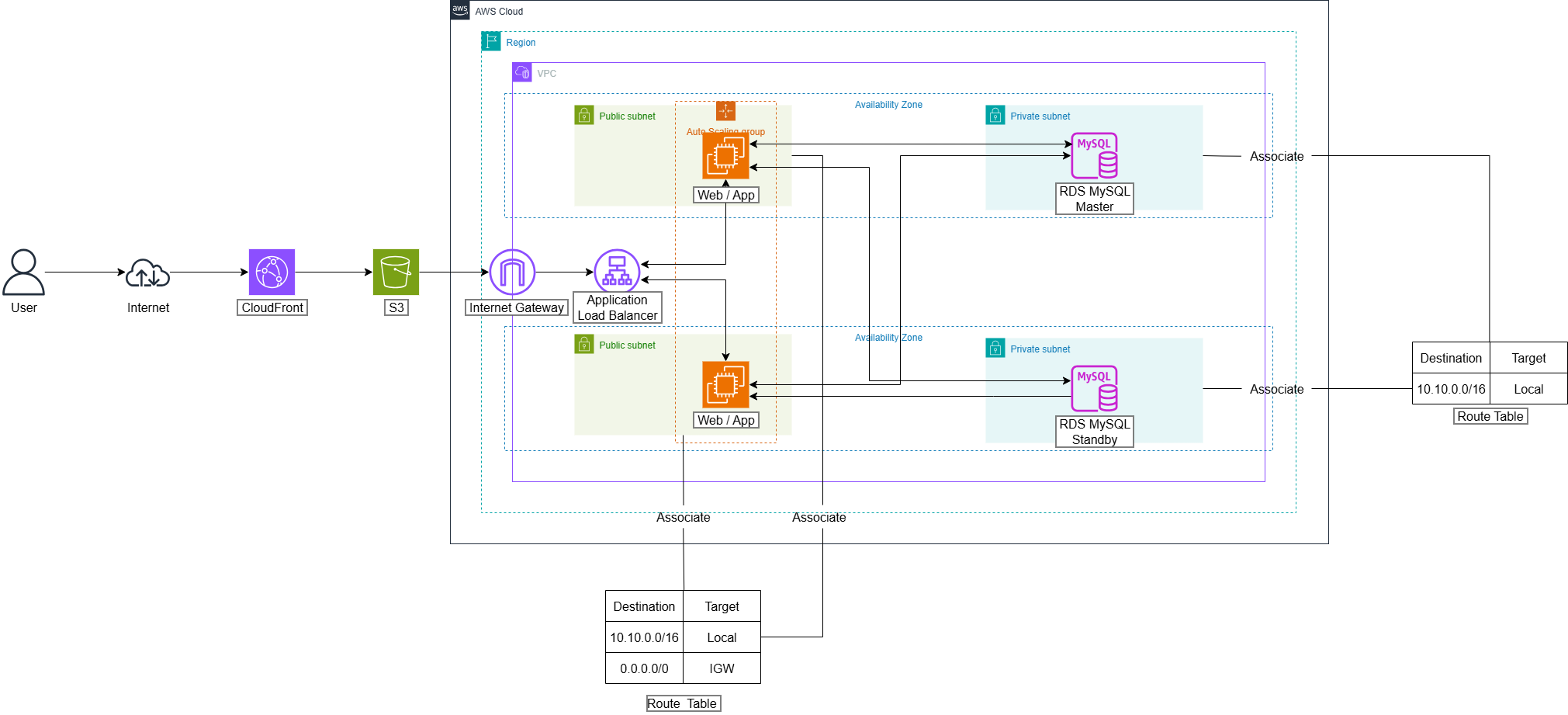
AWS Services Used
Here is a list of the main services and their roles in this project:
Networking & Security
Amazon VPC (Virtual Private Cloud): This is the networking foundation for the entire project. We will create a VPC named
ors-vpcto establish an isolated network environment, allowing complete control over the IP range, subnets, and route tables.Public & Private Subnets:
- Public Subnets: Used for resources that need to be accessed from the internet, such as the Application Load Balancer.
- Private Subnets: Used to house sensitive resources like the backend EC2 servers and the RDS database, preventing direct access from the internet to enhance security.
Security Groups: Act as a virtual firewall to control inbound and outbound traffic.
ors-sg: For the Web Server, allowing traffic from the internet on ports 80 (HTTP), 443 (HTTPS), and 5000 (Node.js App), as well as port 22 (SSH) from your IP for administration.ors-db-sg: For the Database, only allowing connections from servers within theors-sgSecurity Group on port 3306 (MySQL), ensuring the database is completely protected.
Database
- Amazon RDS (Relational Database Service): Provides a fully managed MySQL database. We will create an instance named
ors-dbin a Private Subnet, which simplifies operations, backups, and ensures security.
Compute & Scalability
Amazon EC2 (Elastic Compute Cloud): Provides virtual servers to run the Node.js backend application. These servers will be placed in a Private Subnet.
AMI (Amazon Machine Image) & Launch Template:
- We will configure a complete EC2 instance (installing Node.js, Git, etc.) and then create an AMI named
ors-ami. - This AMI is then used in a Launch Template named
ors-launch-templateto serve as a “blueprint” for creating new servers automatically and consistently.
- We will configure a complete EC2 instance (installing Node.js, Git, etc.) and then create an AMI named
Application Load Balancer (ALB): Automatically distributes incoming traffic from users to multiple backend EC2 servers via a Target Group (
ors-target-group). The ALB also performs health checks to ensure requests are only sent to healthy instances.Auto Scaling Group (ASG): Automatically adjusts the number of backend EC2 servers based on the actual load (e.g., number of requests per minute). When traffic increases, the ASG will automatically add new servers and will remove them when traffic decreases, helping to optimize costs and ensure performance.
Storage & Content Delivery
Amazon S3 (Simple Storage Service): Used to store the entire frontend source code (HTML, CSS, JavaScript, images) in a bucket named
ors-fe. This bucket will be configured to function as a static website.Amazon CloudFront: Is a Content Delivery Network (CDN) service that helps speed up and secure both the frontend and backend.
- Frontend Distribution: Distributes static content from S3. We will use Origin Access Identity (OAI) to lock down the S3 bucket, forcing users to access the website through CloudFront, thereby enhancing security.
- Backend Distribution: Provides a secure HTTPS endpoint for the API, acting as a proxy and forwarding requests to the Application Load Balancer.